Monday 3/21
JavaScript (JS)
If HTML is the content, and CSS is the presentation, then JS is the behavior of your website. JS adds interactivity—it can respond to user interaction—and it makes the site more dynamic.
Use JavaScript to access and modify HTML/CSS content from your website. For example, we can change the class to apply a whole new set of CSS rules.
JavaScript also reacts to events, like mouse clicks, key presses, modifications to a form.
Finally, JavaScript is a programming language—a way to add traditional rules and computation to your website. For example, it can filter through content, and do math.
Script
A script is a series of instructions. It might include blocks of code that respond to certain events, or run only in certain cases (i.e. if something is true, or false).
JavaScript typically goes inside the <head> </head>, or at the bottom of the <body> </body>, of our HTML pages.
JS can be inside of a <script> tag like this:
<script type="text/javascript">
   console.log('Hello World');
</script>
Or, put your code in a separate file, and use the src attribute to link to that file like this:
<script type="text/javascript" src="js/script.js"></script> (*note that you still need to close the <script> tag)
JavaScript Console
The console is available in Chrome, Firefox / Firebug, and other browsers. This is where you'll see error messages, and print messages using console.log('my message'). It is interactive—it's a place to type JavaScript and test it out live in the browser. If you want to learn JavaScript, make good friends with the Console.
Objects
Objects can have Properties (Variables that are part of the, Events, and Methods (Functions of an Object). For example console is an object, and console.log() is one of its methods.
Window Object
window is a JavaScript object that represents the browser.
Document Object
document aka window.document is a JavaScript representation of the HTML content of your webpage. This is known as the Document Object Model, aka the DOM or DOM Tree. Image CC-BY Marty Step
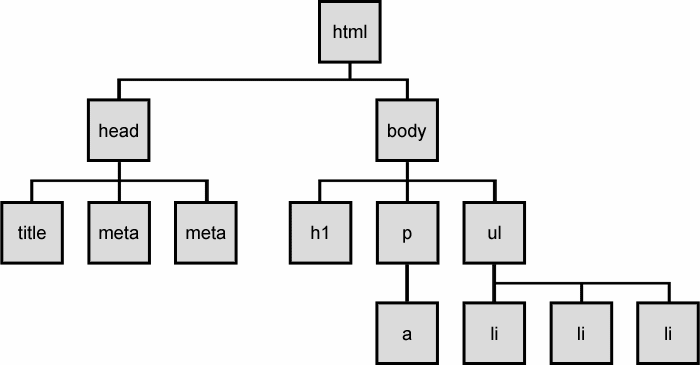
The document allows us to access Elements with methods like
document.getElementById('my-id'); (more info)
Variables
JavaScript variables store data whose value may vary (hence the name variable). Variables can be declared with a statement that gives them a name var myName;.
Data Types
Here are a few examples of assigning variables for different data types:
Strings
var myString = "some text"
var myString = 'some text'

// Use either single or double quotes, but be consistent. This is helpful if you want actual quotation marks to appear in the string like this:
var quote = 'Like Douglas Crockford said, "Obsolete comments are worse than no comments"';
Numbers
var x = 123 // integer
var y = 12.32139021 // float
Booleans
var raining = true;
var snowing = false;
Special DataType: DOM Element
Cache a reference for a "DOM Query":
var myDiv = document.getElementById('my-id');
var listItems = document.querySelectorAll('li.ingredients'); // CSS selector
A few useful properties of all DOM element objects:
element.innerHTMLSets or returns the content of an elementelement.classListReturns the className(s) of an element. The classList has useful methods:add(),remove(), andtoggle()
Expressions
Expressions are a combination of values, variables and operators that convert to a value. For example, we can use arithmetic operators like + - / *. Modulo (%) returns the division remainder, ++ increments and -- decrements.
var x = 8 + 1;
var y = x % 2;
JavaScript also provides special methods for working with Numbers and working with Strings.
Arrays [ ]
var students = ['Joon Hee', 'Stephen', 'Zhijian'];
var things = [3, 'dog', true, '3']; // arrays can mix types (be careful with this!)
If Statement
var something = true;

if (something == true) {
  // do this
} else {
  // do this
}
For Loops
// print numbers 1 through 10 to the console
for (var i = 1; i <= 10; i++) {
  console.log(i);
}
Further Reading
- http://jsforcats.com/
- http://www.w3schools.com/js/js_datatypes.asp
- Many additional resources are listed in our Readings & Resources page
Code From Monday's Class
https://www.dropbox.com/sh/wol2rkdfri60bbb/AAC97JY9EHml-Ehle1MbL1Z8a?dl=0
Wednesday 3/23
We'll keep learning about JS including Functions, Events, Objects, Logic and (more) Loops
Events
element.addEventListener('click', myFunction, false);
https://developer.mozilla.org/en-US/docs/Web/Events
Functions
A function is a group of statements. When a property is part of an object, it's called a method.
Functions can accept parameters, like "name" in the example below.
function sayHi(name) {
  document.write("Hi, " + name);
}
Functions can also return a value with the keyword return
function addNumbers(num1, num2) {
  return num1 + num2;
}
We call a function like this:
addNumbers(3, 5);
sayHi("Jason");
Boolean / Comparison and Logical Operators
Evaluating whether a statement is true or false can be very powerful. Operators like < > == (equal) are very useful.
1 == "1" // evaluates to true
1 === "1" // evaluates to false, because a String and a Number are not strictly equal.
Examples From Class
https://www.dropbox.com/sh/71x0y0r8eag7yxv/AACb5W8V3DRuIIrbj4oJs59-a?dl=0
HW (due next class, as usual):
- Read/do W3's JavaScript tutorial. Focus especially on Events, Functions, Objects, Scope.
- Create a calculator using HTML, CSS and JavaScript. It doesn't need to be a normal calculator, you can do something more abstract, like add Strings or Images instead of numbers. But it should accept user input, and react to events with functions that modify the DOM.
- Upload your calculator to your GitHub, and FTP to your server, then post links to both in the Slack's #hw channel with hashtag #hw7